Desertcart purchases this item on your behalf and handles shipping, customs, and support to Cayman Islands.
🚀 Elevate your desk game with precision, power, and style.
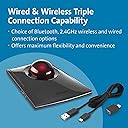
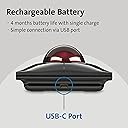
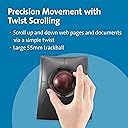
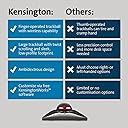
The Kensington SlimBlade Pro is a premium ergonomic trackball mouse featuring a large 55mm ball for precise cursor control, dual sensors for accuracy, and a rechargeable battery lasting up to 4 months per charge. It offers versatile connectivity options including Bluetooth 3.0/5.0, 2.4GHz wireless, and wired USB-C, making it perfect for professionals seeking comfort, customization, and clutter-free productivity.


| ASIN | B0BLRQ4116 |
| Antenna Location | Professional |
| Are Batteries Included? | No |
| Are Batteries Required | No |
| Battery Average Life | 4 months |
| Best Sellers Rank | 10,080 in Computers & Accessories ( See Top 100 in Computers & Accessories ) 5 in Trackballs |
| Brand | Kensington |
| Brand Name | Kensington |
| Button Quantity | 4 |
| Colour | Black |
| Compatible Devices | Personal Computer |
| Connectivity technology | USB |
| Country of Origin | China |
| Customer Reviews | 4.3 out of 5 stars 891 Reviews |
| Enclosure Material | Plastic |
| Global Trade Identification Number | 00085896720805 |
| Hand Orientation | Ambidextrous |
| Hardware Platform | Personal Computer |
| Included Components | Rechargeable battery, USB-C to USB-A charging cable, 2.4GHz wireless dongle (USB-A with USB-C to USB-A adapter), KensingtonWorks software |
| Item Dimensions L x W | 13.3L x 5.5W centimetres |
| Item Weight | 0.24 Kilograms |
| Manufacturer | Kensington |
| Manufacturer Part Number | K72080WW |
| Minimum Required Operating System Version | Windows 10 |
| Model Name | Kensington SlimBlade Pro |
| Model Number | K72080WW |
| Movement Detection | Trackball |
| Movement detection technology | Trackball |
| Network Connectivity Technology | USB |
| Number of Batteries | 2 AA batteries required. |
| Number of buttons | 4 |
| Operating System | Windows, macOS |
| Pattern | Black Slim Blade |
| Power Source | Battery Powered |
| Product Features | Ergonomic Design, Rechargeable, Wireless |
| Product Finish Type | Glossy |
| Product Warranty | 1 Year Manufacturer |
| Range | 1.5 meters |
| Special feature | Ergonomic Design, Rechargeable, Wireless |
| Style Name | SlimBlade Trackball |
| Theme | Technology |
| UPC | 085896720805 |
| Unit Count | 1.0 count |
S**N
it's very practical, easy to use and really easy on the wrist!
So easy to use and customisable buttons make this a great upgrade to your system. Sitting with a mouse for several hours gives me cramps in the wrist and fingers, however with this trackball that's no longer an issue. Firstly ( and there's no way around it) it's big. But in this case the bigger the better. My hand can rest across it with my thumb and little finger perfectly placed for left and right clicks. The rotating ball is large and free moving, however accuracy can be set to whatever level you like or need using the downloaded software and the DPI switch . It's Bluetooth, so no trailing leads on this version - I have this one and a wired version (which I have had for several years now) and they are both excellent. By rotating the ball sideways (turning it with your thumb and fore finger) you can control the elevator bars, making moving up and down through large web pages a breeze. There are 4 main buttons (pads) which are programmable in various combinations and can be set to different commands when your using different programs, ie. buttons can be programmed to carry out one command in Word but the same button carries out a different command in Excel. Some music producers are using this trackball in conjunction with their DAWS, setting up recording commands and for zooming in and out of individual tracks etc. And of course it can be used by both left and right handed people equally. It's relatively expensive but like in life, you get what you pay for, quality is usually not cheap. If you've never used a track ball before, why not order it and give it a go for a week or so, before you decide if it's for you, You can always return it if it's not for you, but somehow after a week, I think you might be persuaded to make the change and free that mouse !
L**D
Excellent for work and comfort. Looks awesome.
This thing is awesome. Plainly put. My hands are pretty big so this things button layout is great for me. The ball is smooth and works like a charm. There is a bit of a learning curb. But! It's usable for basically any task you want to do, be it work or games. I've even seen people play fast paced FPS games with this thing. Its durable and just kind of sits on the desk. Just make sure to dust the ball/ wipe it down every now and then and you'll be good to go. It looks great. It's like having a tiny space ship on my desk. Overall: Great mouse as long as you're willing to learn how to use it which doesnt take long at all.
J**N
Good portable trackball, but doesn't quite match my old favorite
After years of faithful service from my Kensington Expert trackball, I decided to upgrade to the SlimBlade Pro for its portability and modern features. While it's undeniably a quality device, I find myself missing some aspects of my old reliable Expert. The SlimBlade Pro's biggest strength is definitely its portability - being able to easily slip it into a laptop bag and use it anywhere is fantastic. The dual connectivity (Bluetooth and wireless) works seamlessly, and switching between devices is effortless. Battery life is excellent, easily lasting weeks of regular use. The twist-to-scroll feature works well once you get used to it, and the clicking sound isn't as annoying as I feared it might be. Build quality feels premium and the device looks sleek on any desk setup. However, for some reason it just doesn't feel as comfortable or natural as my old Expert did. Maybe it's the different button layout, or perhaps the ball response feels slightly different - I can't quite put my finger on it, but something about the overall experience feels less satisfying. The Expert just had this perfect "feel" that I haven't quite recaptured with the SlimBlade Pro. The trackball does pick up dust and grime fairly quickly, requiring weekly cleaning to maintain smooth operation. Not a huge issue, but worth noting. It's a very good trackball that does everything it promises, and the portability factor alone makes it worthwhile for anyone who travels with their setup. Just don't expect it to necessarily feel better than whatever quality trackball you might already be used to. Pros: Excellent portability, dual connectivity, long battery life, premium build Cons: Doesn't quite match the comfort of older Kensington models, collects dust quickly
R**1
A great alternative to a mouse
Absolutely ideal replacement for mouse. After suffering RSI for years the Slimblade was a joy to use. Took about an hour to get used to using it but well worth the effort. Easy to set up and transfers between my PC and Macbook with no dramas. Battery lasts for weeks between charges and recharges in less than an hour. Not the cheapest option on the market but if you want a quality well designed product this is the one to get.
A**M
Sleek design, easy to use
Was a bit wary of trying this since I already use the Kensington Expert Trackball which has a different profile and a physical scroll wheel. After reading through several reviews and watching some videos I gave this a shot and I'm glad that I did. The flatter profile works well and scrolling wasn't an issue since the sound as I rotated the trackball ensured that I knew it was engaged. The larger sized buttons do work best when clicked closer to the ball itself but when using it that wasn't an issue simply based on where I naturally clicked. It's very sleek and the design is eye-catching. So definitely worth a try if you have a desk setup where you're inclined to hover your hand over the trackball rather than rest your wrist on the desk as you move it.
P**L
Best for quality and reliability, not the best ergonomics
I've had lots of trackballs over the years. All have started off well, but quickly disappointed, typically let down by poor quality switches and poor bearings so the ball would not glide freely. So far, although this isn't my favourite layout, this is proving to be the best for quality and reliability. I like the large ball. It is easy to clean, and it glides nicely. The switches so far are positive and don't bounce. I like the glossy finish too - I can't stand that matt finish that other trackballs use which goes gummy after using it for a while. I'm not a fan of the twist-to-scroll idea, and would have preferred a proper scroll-wheel, but it does the job. I'm a Linux user, so the middle mouse button gets used a lot. Unfortunately, it's not very conveniently placed and requires a change in hand position to use it. I also wish it would wake up quicker after going into power-saving mode. I don't use the pointer for long periods, so when I do reach for it, I have to waggle it around for a couple of seconds to wake it up. The battery life is excellent, so it really doesn't need to power down so aggressively. My search for the perfect trackball continues, but so far this is the best I've found in terms of quality and reliability. It's pointless having a more ergonomic layout if the buttons don't work, or the ball is erratic, so I'm sticking with this for now.
U**!
A liberating and superb mouse
Finding this mouse and installing it (which was very easy) has been very liberating. I am 69 years old and suffer from Parkinson's, which effects the way I use keyboards and the mouse on my computer. I use the computer daily, for my work and find the Kensington Slimblade Pro has made a huge difference to my editing and navigation. It has been enlightening. I highly recommend it
R**P
Works well
I had the old one and this is better. the scrolling take a little to get used to.
M**Ł
Najlepszy trackball
Wygląd kosmiczny, niski profil, duża kulka, precyzja użytkowania bardzo duża, a scroll wheel jako Ruch kulą to game changer.
J**S
Comfort, comfort, comfort ...
This trackball is simply top notch, as far as I am concerned ! Very comfortable to use, low profile, ball is so easy to spin and use, I love the way to scroll while spinning on its axis the wheel while my fingers turn around the base, switches are lovely, nice click, nice sound, nice feeling, glossy finish is nice to touch in the hand ... Bluetooth works great for me (better than my previous 2,4GHz dongles for my older trackballs). Everything on it has been well thought out and the result is an excellent product, well worth its price. Highly recommended (for trackball lovers) !
M**I
Good quality
Durable , and also satisfying to scroll with
L**T
Excellentes retrouvailles
Pour comprendre mon parcours avec les trackballs que j'utilise depuis déjà au moins 8 ans, je vais lister ce que j'ai eu : - une Kensington Orbit qui était tombée HS - une Kensington Slimblade filaire depuis au moins 5 ans : je l'utilisais chez moi puis je l'ai transférée au travail - une Elecom Deft Pro achetée par curiosité il y a on va dire 3-4 ans pour chez moi J'avais bien aimé la Kensington Orbit qui avait d'ailleurs certaines qualités par rapport à la Slimblade qui est cependant supérieure sur beaucoup de points (nous allons y venir). La Slimblade filaire est devenue naturelle pour moi grâce à sa prise en main quasi parfaite pour ma prise/pour la forme de ma main. Bien sûr, la spécificité de la Kensington Slimblade est le défilement avec la boule, là dessus c'est très naturel et agréable avec le bruit de retour satisfaisant. On peut même jouer avec la boule pour se détendre. Elle est également facile à nettoyer et la boule est grande. Si maintenant on ne vient à l'Elecom Deft Pro, j'avais remarqué dès le départ des points assez peu satisfaisants : - elle fait assez cheap à pas mal d'endroits, du moins elle est assez "rugueuse" - la boule n'est pas fluide et accroche souvent - revenir au scrolling à l'ancienne type souris vs l'anneau de l'Orbit ou le défilement naturel avec la boule de la Slimblade est un gros downgrade - le scrolling est fatiguant comme l'accès à certains boutons Cependant, je l'avais gardée histoire de ne pas avoir la même chose partout. Cependant, après une mésaventure hier sur le changement de DPI malencontreux qui semble avoir rendu le trackball encore plus imprécis avec beaucoup d'accroche (et un temps mort au changement de DPI pendant lequel la trackball ne marche plus), je me suis dit que cela suffisait que j'allais acheter enfin une trackball qui me plaît. En premier lieu, je me suis demandé si je n'allais pas prendre une Ploopy (d'autant plus que l'Elecom a rendu une partie de JV pénible et que Kensington n'est pas cité par les gamers), cependant je n'ai pas trop eu envie d'attendre une livraison de l'étranger avec de la douane. Cela me serait sans dout revenu aussi cher que la Slimblade Pro mais on verra une autre fois. J'ai voulu également prendre l'Expert pour varier les plaisirs et économiser un peu, puis je me suis dit que ça serait dommage de revenir à un scrolling mécanique, puis je me suis dit "zut allez je la prends même si je n'aurais aucune surprise". Une fois reçue, le verdict est sans appel : je retrouve bien ce confort, cette fluidité, ce geste naturel que je n'ai pas avec l'Elecom, c'est flagrant, tout est plus fluide et agréable. j'utilise l'index et le majeur à peine courbés et le pouce clique sur le bouton gauche. Le petit doigt touche le bouton droit. Sur l'Elecom, le pouce et les deux doigts sont courbés, ce qui fatigue. Globalement, je peux la manipuler sans tension, presque négligemment du bout des doigts. Mais comble de tout, alors que je m'attendais à avoir la même expérience qu'avec la Slimblade filaire, je me rends compte que cette nouvelle version semble avoir été améliorée aussi en termes de capteur et de précision générale. En effet, même si je ne fais pas vraiment de travaux de précision, il arrive parfois que je doive bien cliquer assez rapidement (je ne joue pas à des jeux rapides, mais je ne peux pas me permettre de trop foirer non plus) et cette version semble à cet effet un peu meilleure. Ce n'est pas le jour et la nuit, mais c'est assez significatif ; c'est peut-être parce qu'elle est neuve également, je mettrai à jour cet avis comme d'habitude. Il arrivait parfois en effet que la Slimblade filaire ait une sorte d'"arrêt" quand on ralentissait. Cet effet est bien moindre ici même s'il semble exister. Le bouton DPI aide également bien à personnalisé son expérience. Autre nouveauté de ce modèle, la possibilité de l'utiliser sans fil avec au choix du BT ou du 2.4Ghz avec le dongle fourni (sous la trackball). Je ne suis pas un grand utilisateur de souris sans fil, surtout vu la forme du produit qui est clairment taillée pour le bureau, mais le 2.4Ghz répond bien (cela a bien marché sur un switch USB Ugreen également), pas testé le BT mais je suppose que oui (je n'en vois pas l'intérêt avec le 2.4Ghz pour ma part mais si c'est là on ne va pas cracher dessus. Pour finir, l'esthétique de cette Slimblade est réussie, plus sombre que la filaire (qui a un anneau chromé et des couleurs un peu plus claires), ce qui fait plus "pro" et élégant si j'ose dire (bon cela ne va pas changer la face du monde). Enfin, Kensington fourni un adaptateur USB A vers C pour le branchement sur le PC, ce qui est un plus. Concernant le software, je ne l'utilise quasiment jamais, les touches par défaut me conviennent (contrairement au deft pro) mais il y a à peu près tout de basique (choix des actions des touches, sens de défilement, accélération...et quand même ce que j'aime bien, la possibilité de ralentir le pointeur, mais n'est-ce pas déjà dans Windows ?). Je ne vais pas m'étendre davantage là dessus car au mieux je vais faire un petit réglage et ne jamais y retoucher. Je ne vais pas non plus revenir sur l'avantage des trackball à mes yeux par rapport à une souris : pas besoin de bouger physiquement l'objet, détente avec le toucher de boule, plus précis pour ma part, gros boutons avec un usage de doigts que je préfère. Pour conclure, je suis content de retrouver ce modèle amélioré, globalement c'est la trackball qui me convient le mieux et de loin même si dans le futur je me laisserai probablement tenter par une Ploopy ou équivalent (si c'est le cas, je posterai une mise à jour ici). Si je devais peut-être déconseiller un achat sur ce modèle, ça serait pour un produit vraiment mobile. Cette trackball a clairement un design pour être posée sur un bureau ou en station prolongée, même acheter une housse pour ça me semble peu pratique, d'où mon désintérêt relatif pour le sans fil (même pour le mouvement , le principe d'une trackball c'est de ne pas bouger). Là dessus, même si elle était moins bonne, la Elecom était plus "portable". (petite, légère, compacte).
J**K
Extraordinary!
After consultation i did buy this trackball, which turns out vest investment for my workflow.
Trustpilot
2 months ago
1 month ago